Documentation topics
LookDev — Production
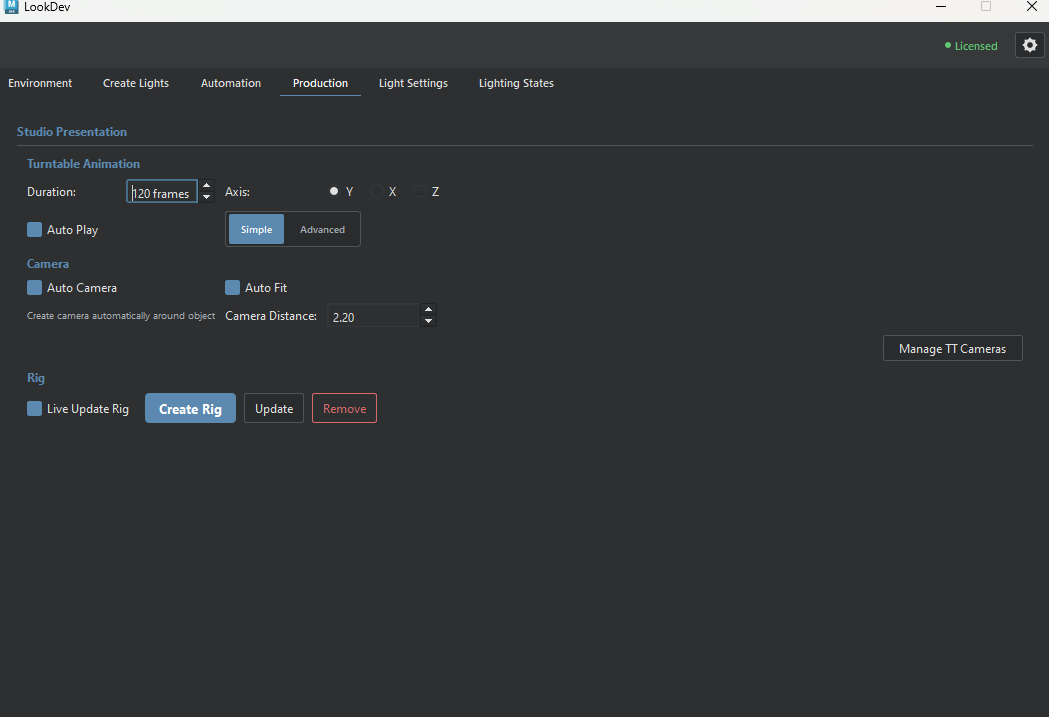
Build and maintain a turntable rig for selected Maya objects, with optional camera framing and automatic playback.
Manage TT Cameras
The dialog distinguishes tagged and legacy turntable cameras. All entries start selected; Select None clears the selection. Delete Selected removes checked cameras from the Maya scene, so review the selection before confirming. Cancel leaves them unchanged.
Turntable and camera setup
Turntable animation
- Duration
- Frames per 360-degree rotation; 120 by default. Higher values produce a slower turn.
- Axis: X, Y, or Z
- Rotation axis for the selected objects. Y is the default upright axis.
- Auto Play
- Starts Maya timeline playback after Create Rig builds the turntable. Turn it off if you want to inspect the new rig before playing it.
- Simple / Advanced
- Simple: Duration controls rotation timing.
Advanced: adds a Speed slider linked to Duration. Both use the same rig. - Speed
- Available in Advanced mode. Drag toward Fast for fewer frames per turn or toward Slow for more. It updates Duration, so the two controls stay linked.
Presentation camera
- Auto Camera
- Creates a dedicated presentation camera with the rig and updates its position when the rig changes. Disable it when using a separately managed camera.
- Auto Fit
- Calculates camera distance from the selected objects' bounds. Camera Distance is unavailable while Auto Fit is enabled.
- Camera Distance
- A distance multiplier based on the objects' size. Turn Auto Fit off to edit it; increase the value to move the camera farther away or decrease it for a closer framing.
- Manage TT Cameras
- Lists tagged and legacy turntable cameras for selective deletion. Deleted cameras are removed from the Maya scene and Outliner.
Rig controls
- Live Update Rig
- Applies motion-axis and camera changes to an existing turntable automatically. It does not create a missing rig; use Create Rig for the first setup.
- Create Rig
- Builds a turntable from the current Maya selection. If a LookDev turntable already exists, this action replaces that rig before creating the new one.
- Update
- Applies current animation and camera settings to the existing rig without rebuilding it.
- Remove
- Removes the LookDev turntable rig and restores the original object hierarchy where possible. It also removes turntable cameras; unrelated scene objects are not the target.