Documentation topics
LookDev — Lighting States
Capture supported attributes from LookDev-created or compatible scene lights. Recall named states or compare them with A/B controls.
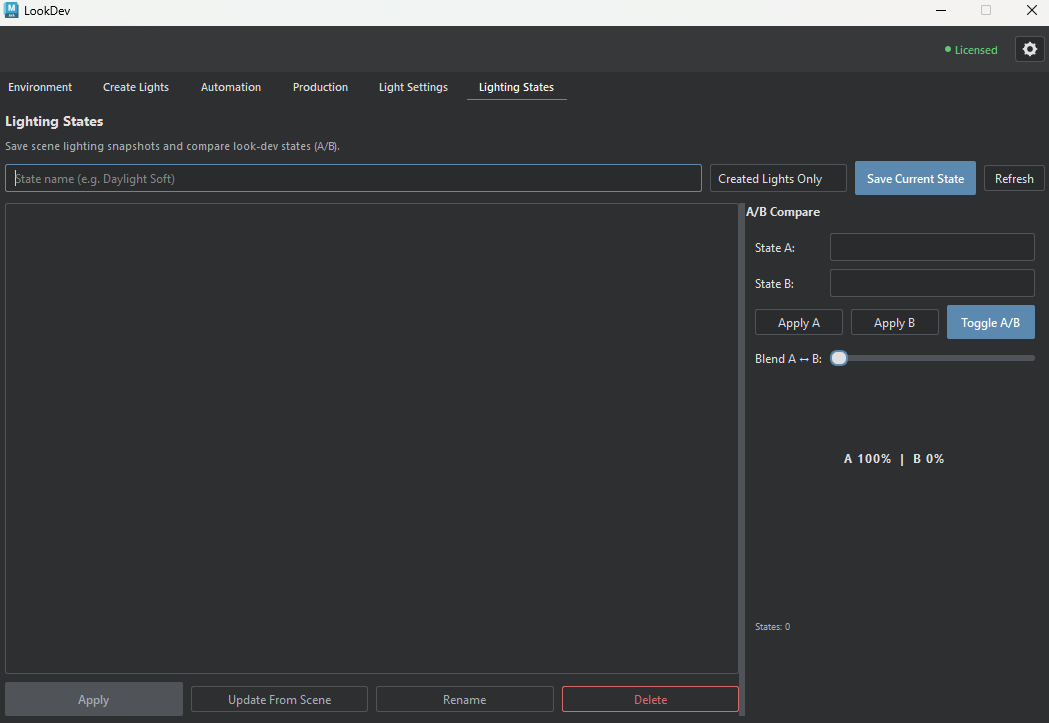
Live-scene behavior
Apply, Toggle A/B, and Blend modify the current Maya scene. Save the existing look before comparing alternatives. Overwriting and deleting saved states require confirmation; neither operation deletes scene lights.
Compare two saved lighting setups
Save the current supported light values with Save Current State, make the next lighting adjustment, and save a second named state. Select them as State A and State B; use Apply A, Apply B, or Toggle A/B to compare them in the current scene. The controls below explain capture scope and which values the Blend slider supports.
Capture and compare lighting
Save and manage states
- Created Lights Only / All Scene Lights
- Created Lights Only: LookDev-created lights.
All Scene Lights: supported compatible lights across the scene.
The capture scope is stored with the state. - Save Current State
- Capture the current supported light values under the name you entered. If that name already exists, LookDev asks before overwriting it.
- Refresh
- Reload saved states from LookDev's configuration after external changes.
- Saved-state list
- Stored lighting setups, not a live scene-light inventory.
- Apply
- Restores the selected state's supported values to lights in the current scene.
- Update From Scene
- Replace the selected state's stored values with a fresh snapshot of the current scene using that state's name.
- Rename
- Change the selected state's label without taking a new lighting snapshot.
- Delete
- Remove the selected saved state after confirmation. This deletes the saved record, not the scene lights.
A/B Compare
- State A / State B
- Two saved lighting setups selected for live comparison. Both must be set before A/B operations.
- Apply A / Apply B
- Applies the corresponding saved values to the current Maya scene.
- Toggle A/B
- Alternates between the selected states in the current scene.
- Blend A ↔ B
- Move the slider from A at 0 to B at 100. For lights matched in both states, it blends supported intensity, Kelvin temperature, and RGB color values in the live scene.
Saved states live in the LookDev configuration, not inside the Maya scene file. Keep this in mind when moving a scene to another workstation.