Documentation topics
LookDev — Create Lights
Create V-Ray lights from Maya geometry with explicit control over light type, source alignment, and placement. Auto detection evaluates each source separately; manual type selection applies the chosen form.
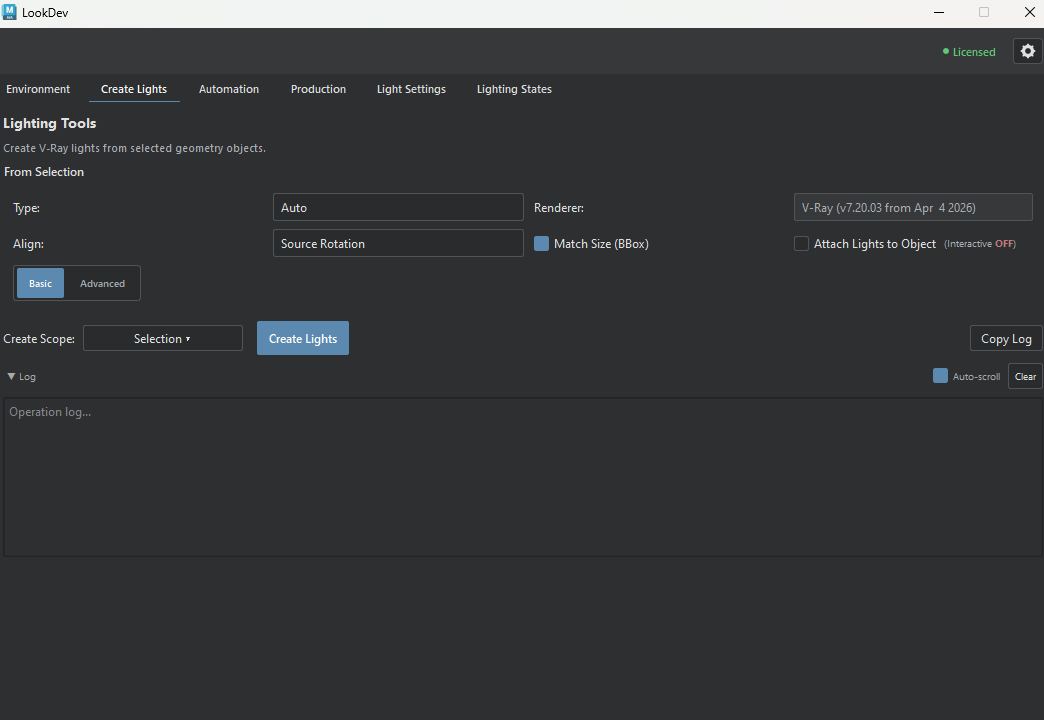
From a selected mesh to a light
Select the source geometry in Maya, then choose Selection as the Create Scope. Check the proposed light type and placement; use a manual Type if Auto is not suitable for that source. Run Create Lights only after reviewing the selection estimate. Check the operation log for created, skipped, or failed items before adjusting the scene.
Geometry-driven light creation
Light type and alignment
- Type
- Auto: detect a light type for each source object.
Rect, Spot, Sphere, Mesh Light: create the selected light type from each source object. Rect, Sphere, and Mesh lights require V-Ray. - Renderer
- Shows the renderer used for new lights. V-Ray light creation fails if V-Ray is unavailable; LookDev does not substitute another light type.
- Align
- Source Rotation: use the source transform.
Along Fixture Axis: align to the detected source axis.
Source axis: use an object-local axis.
World axis: use a scene-space direction. - Match Size (BBox)
- Set the light's supported size or radius from the source geometry's bounding box. Turn it off when you want to size the resulting light manually.
- Attach Lights to Object
- Interactive attachment applies to directly selected LookDev-created lights while you move their source object. It is off by default and is separate from Parent Mode.
- Basic / Advanced
- Advanced reveals placement, direction, parenting, and source-visibility controls. The selected light type is retained.
Advanced placement
- Placement
- Pivot: source origin or rotate pivot, according to Use Pivot.
BBox Center: center of the source bounds, independent of an offset pivot.
BBox End: end of the longest bounding-box axis.
Vertex Tip / Selected Vertex: geometry-derived or explicitly selected vertex position. - Use Pivot (Origin)
- When Placement is Pivot, use the source rotate pivot rather than its translation. It does not affect BBox or vertex placement modes.
- Flip Direction
- Reverse the selected end or axis direction when a light points toward the wrong side of the source mesh.
- Parent Mode
- None: leave the light unparented.
To Source: follow the source transform.
To Control Locator: use a locator parent for independent adjustment. - Hide Source Mesh
- Hide the source geometry after light creation. Use it only when that mesh should no longer be visible in the scene.
- Detection Result
- Read the proposed type for the current selection before creating lights. Auto detection is evaluated per source object.
- Selection estimate
- Check selected-object count, estimated lights, and hierarchy count before creation. These numbers are a preview, not a completed scene change.
Create and review
- Create Scope
- Selection: selected objects.
Selection Hierarchy: selected roots and their descendants. - Create Lights
- Creates lights for the chosen scope. The result log distinguishes created, skipped, and failed objects.
- Log
- Expand the operation log to review created, skipped, and failed entries.
- Copy Log
- Copy the displayed operation log to the clipboard for troubleshooting.
- Auto-scroll and Clear
- Auto-scroll follows new entries. Clear empties the displayed log rather than deleting scene lights.