Documentation topics
LookDev — Automation
The Automation tab detects light-source meshes by attribute or name, previews the resulting set, and creates V-Ray lights in a batch. Use Create Lights for direct creation from a manual selection. To see how batch creation fits with the other Maya lighting tools, visit the LookDev for Maya product overview.
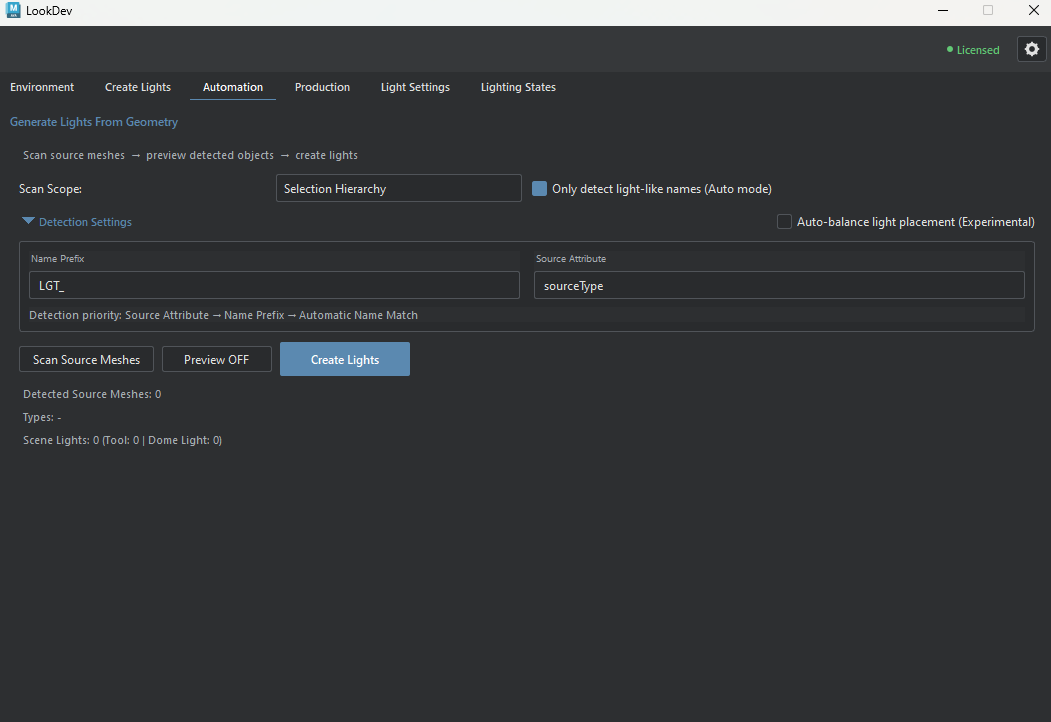
Review a batch before creating lights
Start with Selection Hierarchy or Selection Only when you want to limit the source set. Source Scan identifies candidate meshes and light types without creating or replacing lights; inspect the detected count and types. Preview changes the Maya selection so you can inspect the sources. Run Create Lights only after checking the set: creation can replace matching LookDev lights associated with those sources. Use Scene scope with particular care.
Source detection and batch creation
Detection rules
- Scan Scope
- Sets the geometry considered for detection. Scanning does not create or replace lights.
- Selection Hierarchy (default)
- Selected roots and eligible geometry descendants.
- Selection Only
- Selected geometry; selected Maya groups can resolve to eligible descendants.
- Scene
- Eligible geometry across the scene. A broader scan can return more sources; replacement occurs only if Create Lights runs.
- Only detect light-like names (Auto mode)
- Checked by default. When on, light-like name keywords are a fallback after Source Attribute and Name Prefix. When off, keyword matching is skipped; attribute and prefix detection remain active.
- Detection Settings
- Detection priority: Source Attribute, Name Prefix, then automatic name matching when Auto mode is enabled. This section is expanded by default.
- Name Prefix
- Detect source meshes whose names begin with the configured prefix. The default is
LGT_. - Source Attribute
- Read a Maya attribute that classifies light-source geometry.
sourceTypeis the default, withfixtureTypesupported as a fallback. - Auto-balance light placement (Experimental)
- Off by default. Adds a post-creation alignment and placement pass for detected sources. Review the result before applying it to a broad scan.
Advanced Batch Tagging
Batch tagging writes source-classification and optional group attributes to Maya geometry before detection. This section is collapsed by default.
- Batch Type Tag
- Type written to selected source meshes: rect (default), spot, sphere, mesh, or auto.
- Batch Group
- Optionally store a grouping value such as Kitchen or LED on the tagged sources.
- Group Attribute
- Name the Maya attribute that stores the optional group value. The default is
sourceGroup; change it only if your pipeline expects another name. - Only tag untagged sources
- Checked by default. When on, already-tagged source meshes keep their existing type tags. Turn it off only when the batch should replace those tags.
- Tag Selection
- Write the chosen type and optional group tag to the selected source meshes. Selection Hierarchy can include descendants according to Scan Scope.
- Tag Name Family
- Extends tagging from selected source meshes to similarly named objects within the scan scope. A Tube001 selection can identify the Tube002–Tube200 name family.
- Select Untagged
- Select source meshes without a
sourceTypeorfixtureTypetag for review before batch creation.
Scan and create
- Scan Source Meshes
- Reports candidate meshes and detected types without creating lights.
- Detection summary
- Detected Source Meshes reports the candidate count; Types breaks it down by detected light type. Scene Lights reports the scene total, LookDev-managed lights, and dome lights.
- Preview OFF / ON
- Selects detected source meshes in the Maya viewport without creating lights. The preview changes the current Maya selection.
- Create Lights
- Creates lights for the detected set and replaces matching LookDev lights associated with those sources. The result reports created, skipped, and failed items.